Toon Boom: The Complete Guide to Professional 2D Animation Software
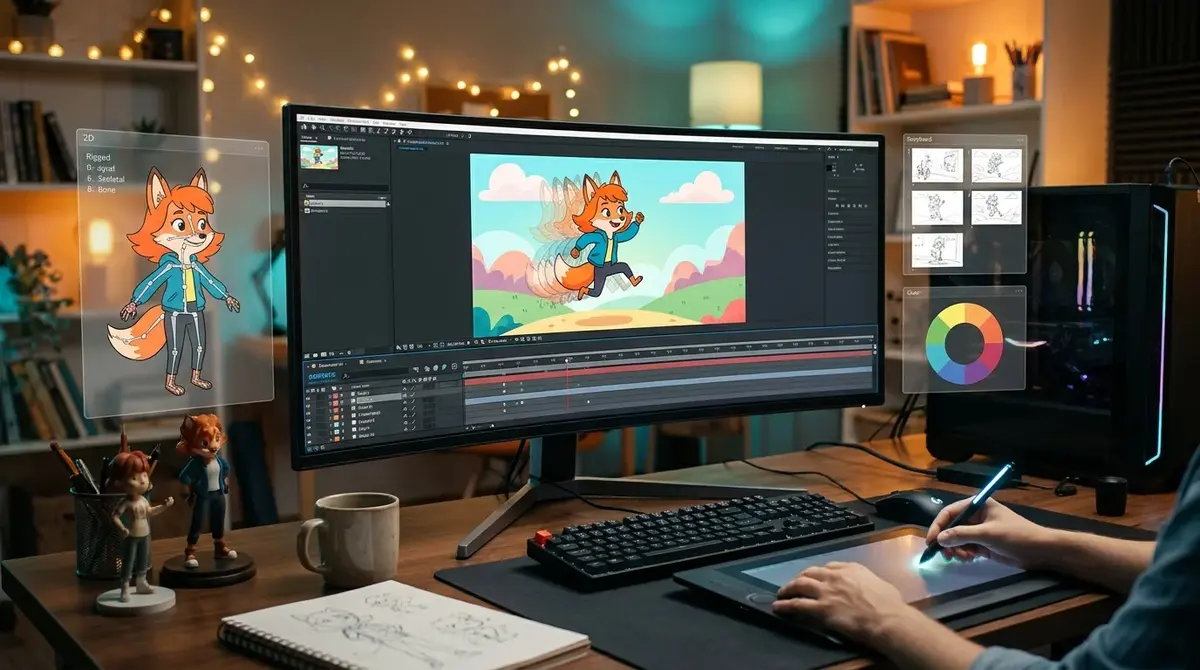
You want to create stunning 2D animations, but clunky tools slow your workflow and drain creative momentum. Missed deadlines and stiff character movements frustrate both clients and audiences. Toon Boom eliminates these headaches by handing animators a production-grade toolkit built for speed, precision, and beautiful frame-by-frame results right out of the box.
What Is Toon Boom and Why Do Animators Trust It?
Toon Boom is a Montreal-based software company that builds industry-standard 2D animation and storyboarding tools. Studios across the globe rely on its flagship products — Harmony and Storyboard Pro — to produce television shows, feature films, and video game cutscenes.
The software earned its reputation through decades of real-world use on productions like The Simpsons, Rick and Morty, and Klaus. When a tool survives the pressure of broadcast deadlines and theatrical releases, you know it delivers.
How Does Toon Boom Harmony Work for 2D Animation?
Harmony serves as the core animation engine inside the ecosystem. It combines traditional hand-drawn techniques with modern rigging, compositing, and special effects inside a single workspace.
Animators draw directly on a digital canvas using pressure-sensitive tablets. The software captures every stroke with vector or bitmap precision, letting you switch between clean line art and painterly textures without changing programs.
Harmony also supports cut-out animation, where you build character puppets from layered body parts and animate them with deformers and inverse kinematics. This hybrid approach saves hours on repetitive motion while keeping the organic feel of hand-drawn work.
What Makes Toon Boom Storyboard Pro Different?
Storyboard Pro focuses entirely on pre-production. Directors and storyboard artists use it to sketch scenes, add camera moves, layer dialogue tracks, and generate animatics before a single frame of final animation begins.
Unlike generic drawing apps, Storyboard Pro integrates shot management, timing sheets, and export pipelines that feed directly into Harmony. This tight connection between pre-production and production keeps teams aligned and reduces costly revision cycles.
Which Toon Boom Software Should You Choose?
Picking the right product depends on your role and project scope. Here is a quick breakdown:
- Harmony Essentials — Best for students and solo animators working on short films or web content.
- Harmony Advanced — Fits small studios that need rigging and basic compositing.
- Harmony Premium — Powers large-scale TV and film pipelines with advanced effects and multi-user collaboration.
- Storyboard Pro — The go-to choice for directors, storyboard artists, and pre-production teams.
Start with Essentials if you are learning. Upgrade as your projects grow in complexity.
How Much Does Toon Boom Cost in 2025?
Pricing varies by product and subscription tier. Toon Boom offers both annual subscriptions and perpetual licenses, giving freelancers and studios flexible payment options.
- Harmony Essentials: Roughly $25/month on an annual plan.
- Harmony Advanced: Around $65/month on an annual plan.
- Harmony Premium: Approximately $115/month on an annual plan.
- Storyboard Pro: About $55/month on an annual plan.
Check the official Toon Boom pricing page for the latest numbers, as rates shift with seasonal promotions and educational discounts.
What Are the Key Features of Toon Boom Harmony?
Harmony packs a deep feature set that covers the full animation pipeline:
- Vector and bitmap drawing tools with customizable brush engines.
- Node-based compositing for layering backgrounds, characters, and effects.
- Deformers and IK rigs that bend limbs and faces naturally.
- Particle systems for rain, fire, smoke, and magical sparkles.
- Multiplane camera that adds parallax depth to flat scenes.
- Lip-sync automation linked to audio waveforms.
- Palette management for consistent color across episodes.
These tools work together inside one interface, so you spend less time switching between programs and more time animating.
Can Beginners Learn Toon Boom Easily?
Yes, but expect a learning curve. Harmony offers more depth than beginner-friendly apps like FlipaClip or Krita, so the interface can feel overwhelming during your first week.
Start with the free trial and follow the official Learn Portal tutorials. Focus on one skill at a time — basic drawing, then simple rigging, then compositing. Within a few weeks of consistent practice, the workspace starts to feel intuitive.
Many animation schools now teach Harmony as part of their curriculum, which means structured courses and active community forums are easy to find.
How Does Toon Boom Compare to Other Animation Software?
Here is a side-by-side look at how the platform stacks up against popular alternatives:
| Feature | Toon Boom Harmony | Adobe Animate | TVPaint | Moho Pro |
|---|---|---|---|---|
| Best For | TV & film production | Web & interactive | Traditional frame-by-frame | Cut-out & rigging |
| Drawing Tools | Vector + bitmap | Vector only | Bitmap only | Vector only |
| Rigging | Advanced IK/FK | Basic bone tool | None | Smart bone system |
| Compositing | Node-based | Layer-based | Limited | Layer-based |
| Pricing | $25–$115/mo | $22.99/mo | One-time $349+ | One-time $399 |
| Industry Adoption | Very high | Moderate | Niche | Growing |
Harmony wins on pipeline integration and large-team collaboration. Adobe Animate works better for interactive web content. TVPaint suits purists who want a paperless traditional workflow. Moho excels at fast cut-out rigs for YouTube channels.
What Studios Use Toon Boom for Production?
Major animation houses trust this software for their biggest projects. A few notable examples include:
- Bardel Entertainment — Rick and Morty, Teen Titans Go!
- Mercury Filmworks — Hilda, The Ghost and Molly McGee
- Rough Draft Studios — Futurama, The Simpsons
- SPA Studios — Klaus (Academy Award-nominated feature)
According to Animation World Network, studios in over 130 countries run Harmony pipelines for broadcast and streaming content. That global footprint speaks to the software’s reliability under tight production schedules.
How Do You Set Up a Toon Boom Animation Pipeline?
A smooth pipeline connects storyboarding, asset creation, animation, compositing, and final output. Here is a simplified workflow:
- Storyboard scenes in Storyboard Pro and export timed animatics.
- Design characters and backgrounds in Harmony or an external illustration tool.
- Rig characters with deformers, master controllers, and color palettes.
- Animate key poses and in-betweens on the timeline.
- Composite layers, add camera moves, and apply visual effects.
- Render final frames in your target resolution and frame rate.
Harmony Premium supports database-driven collaboration, so multiple artists can work on the same scene simultaneously without overwriting each other’s files.
What Are the Best Tutorials for Getting Started?
Free and paid resources abound. Start here:
- Official Learn Portal — Step-by-step courses for every skill level, directly from the developer.
- YouTube channels like Nicolai Moltke-Leth and Tadr Academy for practical, project-based tips.
- Domestika and School of Motion for structured paid courses with instructor feedback.
- Community forums on the official website for troubleshooting specific technical issues.
Practice with small projects first. Animate a bouncing ball, then a walk cycle, then a short dialogue scene. Building skills incrementally keeps frustration low and motivation high.
Is This Animation Software Worth the Investment for Freelancers?
If you plan to pitch work to TV studios or streaming platforms, Harmony gives you a clear advantage. Most production houses expect deliverables in Harmony file formats, so owning the software removes a major barrier to entry.
For solo creators making YouTube content or short films, the Essentials tier provides more than enough power at a low monthly cost. The return on investment comes from faster production times and professional-quality output that attracts higher-paying clients.
Frequently Asked Questions
Is Toon Boom free to use?
No, but the company offers a 21-day free trial for all products. Students and educators can access discounted licenses through the official education program.
What is Toon Boom primarily used for?
It is used for 2D animation, storyboarding, and compositing in television, film, and game production. Harmony handles animation while Storyboard Pro handles pre-production planning.
How long does it take to learn the software?
Most beginners grasp the basics within four to eight weeks of daily practice. Mastering advanced rigging and compositing typically takes six to twelve months of consistent project work.
Can it run on both Mac and Windows?
Yes. Harmony and Storyboard Pro are fully compatible with macOS and Windows. Linux support is available for Harmony Premium in studio environments.
Does the software support 3D animation?
Harmony includes limited 3D capabilities, such as importing 3D models into 2D scenes for reference or hybrid shots. For full 3D production, pair it with dedicated tools like Blender or Maya.
What is the difference between Harmony Essentials and Premium?
Essentials covers drawing, basic rigging, and simple compositing for individual creators. Premium adds advanced particle effects, multi-user database collaboration, and full pipeline integration for large studio teams.
Your next animated project deserves tools that keep up with your imagination. Download the free trial, follow the beginner tutorials, and build your first scene this week. The animation community is waiting to see what you create — so open the canvas and start drawing.
Written with hands-on knowledge of 2D animation production workflows. Sources include Toon Boom Animation Inc., Animation World Network, and the Toon Boom Learn Portal. All pricing and feature details reflect publicly available information as of 2025.
Featured Guides
Blogs Toon Boom: The Complete Guide to Professional 2D Animation Software ✍…
Blogs Toon Boom: The Complete Guide to Professional 2D Animation Software ✍…
Blogs Toon Boom: The Complete Guide to Professional 2D Animation Software ✍…